
AI Support Agent Launch Checklist
A practical pre-launch checklist for putting an AI support agent live: content, testing, scope, escalation, and the metrics to watch in week one.
Putting an AI support agent live is low-risk if you do a few things first and high-risk if you skip them. The failure mode is launching a bot that gives wrong answers, frustrates customers, and damages trust faster than it deflects tickets. The good news is that the checklist to avoid that is short, and most of it is content and testing rather than technical work. This page walks through the pre-launch steps in order, the scope decision that matters most, and the metrics to watch in the first week so you catch problems early. It is written for a startup launching its first agent, but the checklist holds at any size.
Before you launch: content and testing
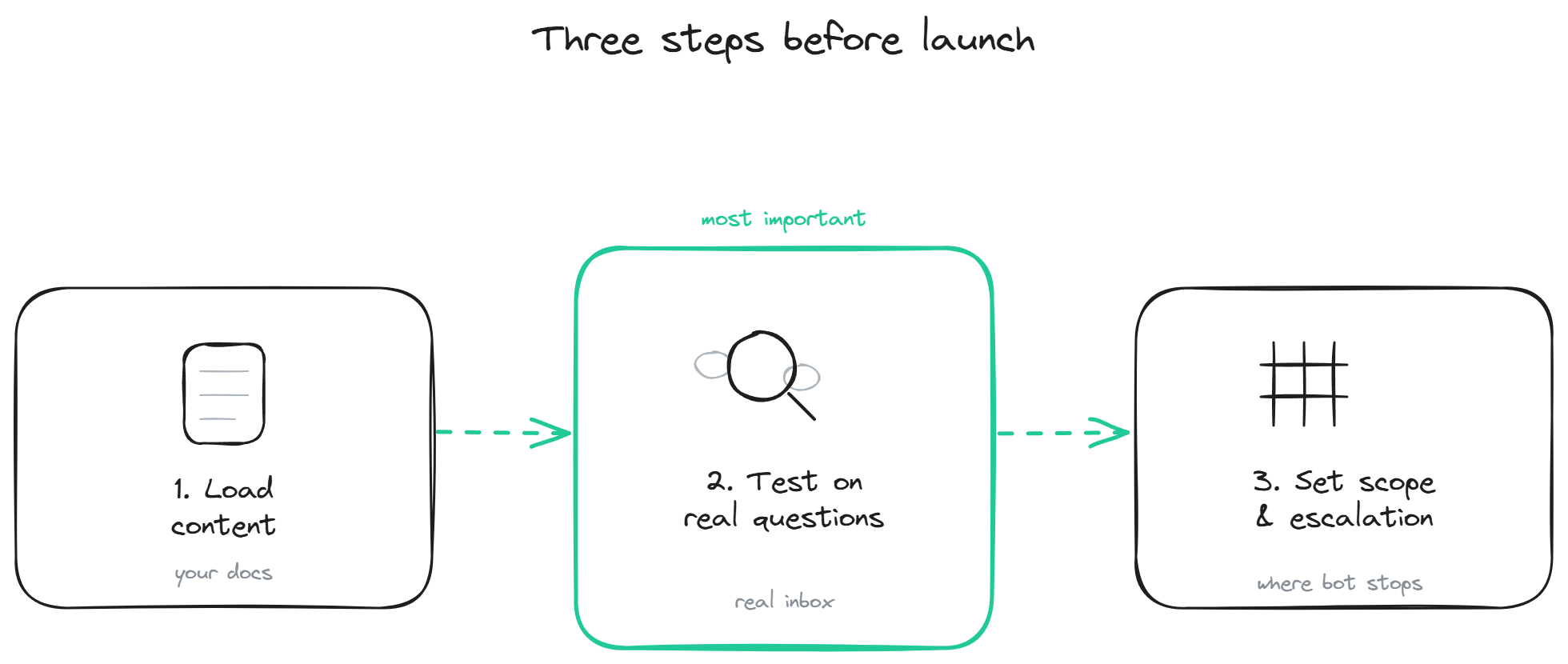
The first block of the checklist is getting the content right, because a grounded bot is only as good as what it is grounded on.
Load your real content. Point the bot at your actual documentation, FAQs, and help articles. It does not need to be exhaustive, but it needs to cover your highest-volume question categories. Thin content is fine to start; wrong or outdated content is not, so clear out anything stale before it becomes a confident wrong answer.
Test on real questions. This is the single most important pre-launch step. Take the actual questions from your support inbox (the real phrasings customers use, not idealized versions) and run them through the bot. Check that it answers the common ones correctly and, just as important, that it refuses cleanly on the ones it should not answer. The test responses page covers a structured way to do this. Do not skip it; a bot tested only on questions you wrote yourself will surprise you in production.
Set the answer scope. Decide what the bot should and should not attempt. A startup launching its first agent should usually start narrow: high confidence on the top categories, clean refusal and routing on everything else. You can widen scope as you gain confidence. Starting narrow and accurate beats starting broad and wrong.
The scope and escalation decision
The decision that most affects whether your launch goes well is where the bot stops and a human takes over. Get this right and a wrong answer becomes a clean handoff; get it wrong and the bot guesses on things it should escalate.
Define the escalation path before launch. When the bot cannot answer, or when a customer asks for a human, or when the topic is sensitive (billing disputes, complaints, anything emotional), the conversation should route to your team cleanly. For a startup, this usually means the bot creates a ticket or routes to your shared inbox with the conversation context attached, rather than a live transfer you cannot staff. Be clear with yourself about what your team can actually cover, and set the bot's escalation to match.
Set the bot's default toward refusal over guessing. A startup's reputation is fragile, and one confidently wrong answer to an early customer does more damage than ten honest "I don't have that, let me get someone" responses. Configure the bot to refuse and route when it is not confident, which protects trust during the period when you are still tuning.
Tell customers what they are talking to. A brief, honest disclosure that this is an AI assistant, with an easy way to reach a human, sets the right expectation and is increasingly expected. It costs nothing and prevents the frustration of a customer who thinks they are talking to a person.
Week one: what to watch
The launch is not done when the bot goes live; the first week is when you catch what testing missed. A short, focused review in week one catches most problems before they compound.
Watch the gap log: the questions the bot could not answer. This is the highest-value data you have, because it tells you exactly what content to add next. A startup using the autolearning loop gets this captured and fed back semi-automatically, but you should still read it, because it also reveals what your customers actually need.
Watch the re-contact rate: customers who came back with the same question after a bot conversation. A high re-contact rate means the bot is giving answers that do not actually resolve, which is the failure that hides behind a good-looking deflection number. Catch it early and fix the underlying content or scope.
Watch the escalations: are they routing cleanly, is your team receiving the context, are customers reaching a human when they need one. A broken escalation path is the worst week-one problem because it strands the customers the bot correctly decided not to handle.
Watch the wrong answers: spot-check bot conversations for anything inaccurate. A handful of wrong answers in week one is normal and fixable; the point of watching is to fix them fast before they accumulate. The lean teams page covers fitting this review into a small team's schedule.
BestChatBot supports a careful launch: grounded answers from your content, honest refusal over guessing by default, clean routing to a ticket or inbox with full context, and a gap log plus supervised autolearning loop that turns week-one questions into the content the bot answers next. For pricing details, see plans.
FAQ
- How long does a launch take for a startup? The technical setup is days, sometimes less. The content and testing work is what takes the time, and it is worth doing. A rushed launch with untested content is the main way these go wrong. Plan for a short testing pass before going live.
- What is the single most important pre-launch step? Testing on real questions from your actual inbox. A bot tested only on questions you wrote yourself will behave differently in production, because real customer phrasings are messier. This step catches the most problems for the least effort.
- Should I launch narrow or broad? Narrow, for a first launch. High confidence on your top question categories, clean refusal and routing on everything else. Widen scope as you gain confidence. Starting broad and wrong damages trust faster than starting narrow and accurate builds it.
- What if the bot gives a wrong answer after launch? Expected in small numbers, and fixable. Watch for it in week one, correct the underlying content or scope, and the autolearning loop helps the bot improve. The way to minimize it is configuring the bot to refuse over guess, so it errs toward "I don't know" rather than confident error.
- Do I need to tell customers it is a bot? It is good practice and increasingly expected. A brief honest disclosure with an easy path to a human sets the right expectation and prevents the frustration of a customer who assumed they were talking to a person. It costs nothing and helps trust. For pricing details, see plans.
For pricing details, see plans.
Visit the startup support hub.