
How to Test AI Support Responses
Test AI support responses in 5 steps: build a corpus, define a rubric, run the tests, triage failures, decide on launch. The QA framework most teams skip.
Article body
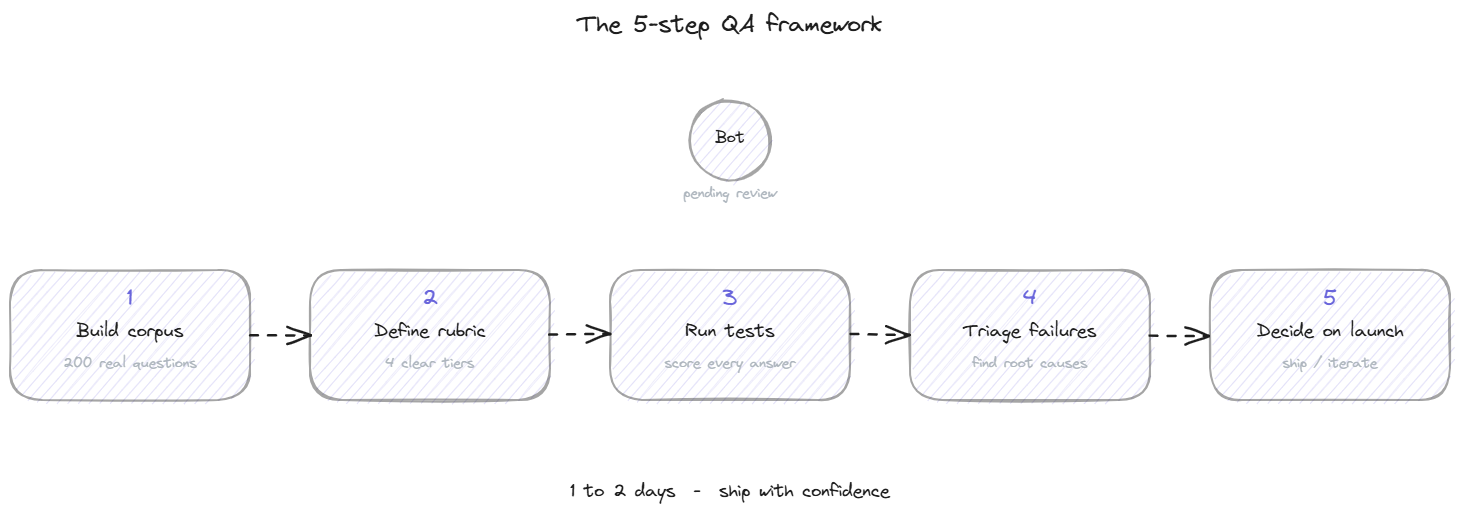
Most teams test AI support responses by typing a handful of obvious questions into the bot, getting reasonable-looking answers, and declaring the bot ready for launch. That approach has a predictable failure pattern: 4 weeks after going live, the support team is overwhelmed with complaints about wrong answers the team never thought to test for. The cost of a real QA pass is small (1 to 2 days of focused work). The cost of skipping it is measured in months of damage control. This page covers the 5-step framework for testing AI support responses honestly, the rubric that produces actionable results, and the ongoing testing pattern that keeps the bot accurate after launch.
Why testing is the step everyone skips
The skip happens for understandable reasons. The bot looks like it works. The vendor said it works. The first 5 questions you typed got reasonable answers. The team is under pressure to ship. Each of these reasons is real and none of them is a substitute for actually testing.
The cost of skipping shows up as a slow leak rather than a single failure. Wrong answers create individual customer complaints that get handled individually, so nobody on the team sees the pattern. By the time someone runs the aggregate numbers (3 months in), the bot's resolution rate is lower than the human team's baseline, customer trust has eroded, and the team is debating whether to turn the bot off entirely.
The fix is to spend 1 to 2 days running a structured test before launch, document the baseline, and use the same framework for ongoing checks. This is unglamorous work that produces high leverage. A team that tests properly catches 80% of the failure modes before they reach customers. A team that does not test catches them through customer complaints, at significantly higher cost per failure.
Step 1: Build the test corpus
The test corpus is the set of questions you will run through the bot to evaluate its responses. The quality of the corpus determines the quality of the test. A corpus of 10 obvious questions tells you nothing useful. A corpus of 200 representative questions tells you almost everything you need to know.
The fastest way to build a real corpus is to pull historical support tickets. Take the last 200 to 500 closed tickets from your help desk. Strip the personally identifiable information. Extract the core question from each ticket. The result is a corpus that reflects the actual distribution of customer questions, including the awkward phrasings and edge cases that synthetic test data always misses.
If you do not have historical tickets, the second-best source is recorded search queries from your help center, your site's search bar, or your existing chat tool. The third option is to ask the support team to write 100 to 200 questions from memory, distributed across the categories they handle most often. This is less representative than ticket data but better than no corpus.
Group the corpus by category: billing, refunds, integrations, onboarding flow, error messages, account access, product feature questions, and so on. Categorization will matter in the triage step.
Step 2: Define the scoring rubric
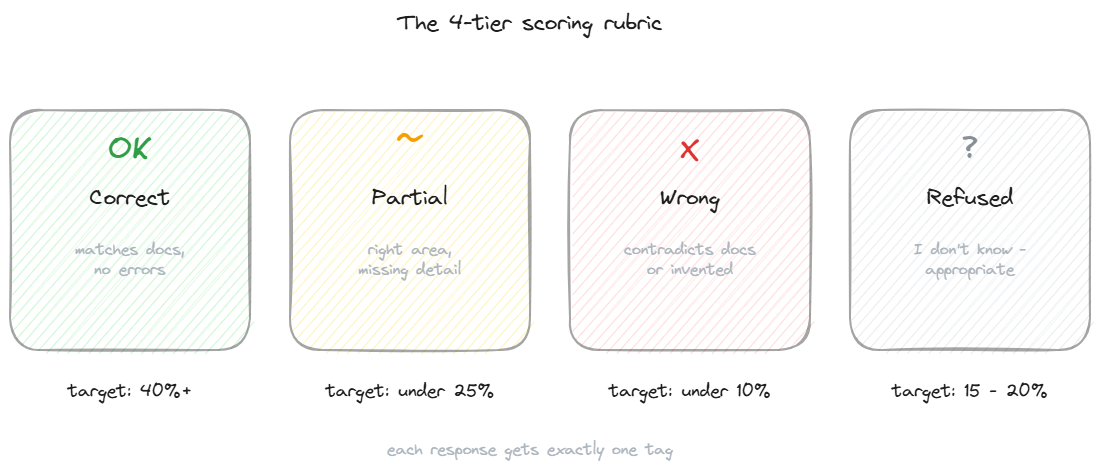
A useful response evaluation rubric has 4 tiers. Each response gets exactly 1 tag.
Correct means the bot's answer matches the documentation, contains no factual errors, and a customer acting on it would be correctly informed. This is the target outcome.
Partial means the bot's answer is in the right area but missing important detail or context. The customer would not be misled, but they might need to ask a follow-up question or check the docs themselves. Partial answers are not failures, but they indicate either weak retrieval or thin source content.
Wrong means the bot's answer contradicts the documentation, invents information that does not exist, or quotes a policy that is not yours. A customer acting on a wrong answer would be misinformed. These are the failures that produce real-world cost and the failures the testing exists to catch.
Refused means the bot honestly said "I don't have that information" or directed the customer elsewhere. For questions the bot does not have content for, refusal is the correct behavior. A high refusal rate on questions that should be answered is a separate problem (missing content), but the refusal itself is not a failure.
Healthy targets at launch baseline: 40%+ correct, 25% or fewer partial, under 10% wrong, 15-20% refused. The wrong category is the one that should be near zero before any public launch.
Step 3: Run the tests
Feed each question from the corpus into the bot one by one. Capture the response. Tag it with one of the 4 rubric tiers. This is mechanical work and takes about 4 to 6 hours for a corpus of 200 questions if done by one person.
If you have a team running the test together, split the corpus by category and have different people score different categories. This catches a calibration issue (different people scoring the same response differently) by surfacing the categories where disagreement is highest. Resolve disagreements by re-reading the documentation, not by averaging the scores.
A useful side practice during the test run is to capture the bot's confidence indicators where available. Some platforms expose a confidence score per answer or a flag for "low-confidence response." Tagging your manual rubric tier alongside the system's confidence indicator tells you whether the bot's self-assessment is accurate. A bot that gives high-confidence wrong answers is more dangerous than one that flags its own uncertainty.
Step 4: Triage the failures
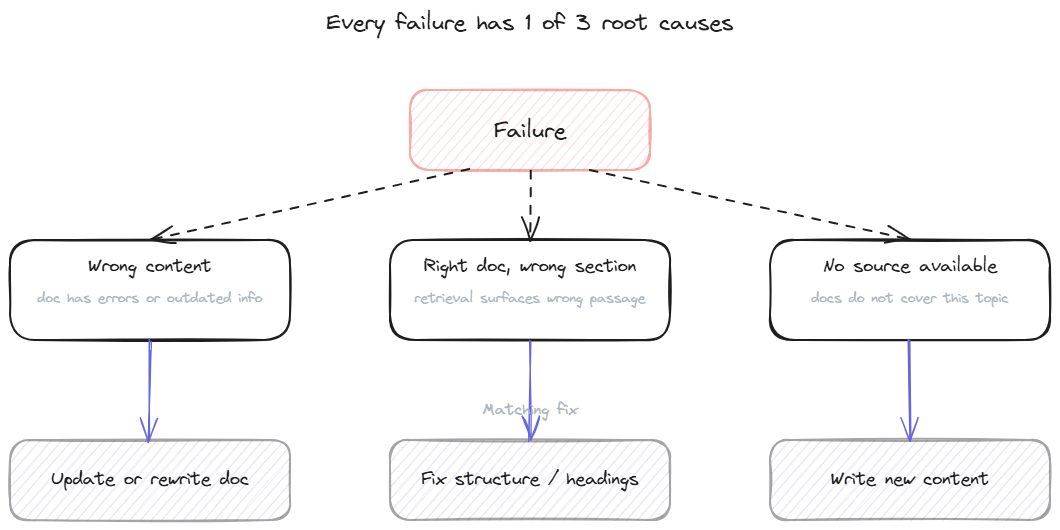
The wrong and partial categories from Step 3 are the working list for fixes. Each entry on the list has a root cause that falls into 1 of 3 buckets.
Wrong content in the knowledge base. The source document itself contains an error, an outdated number, or a policy that no longer matches reality. The fix is to update or rewrite the source content. This is the most common root cause and the easiest to address. When the fix is a single passage, editing the entry by hand is usually the quickest route.
Right document, wrong section. The retrieval picked the correct document but pulled the wrong passage from it, so the answer is technically grounded but answering a slightly different question. The fix is to restructure the source content, tighten the chunking, or add clearer section headings so retrieval surfaces the right passage.
No source available. The bot answered (or refused) a question the documentation does not actually cover. The fix is to write new content. Whether to write that content depends on whether the question is common enough to justify the effort; some questions are correctly answered with "contact support" rather than by adding a doc.
A good triage produces a list of fixes ranked by impact: which fixes will resolve the most failures per hour of work. Start with content errors that affect multiple corpus questions, then chunking fixes, then new content creation.
Step 5: Re-test and decide on launch
After the fixes from Step 4 are in place, re-run the corpus. The same scoring rubric, the same people doing the scoring, the same workflow. Compare the new results to the baseline.
The improvement targets depend on where you started. A bot at 40% correct that climbs to 65% after 1 round of fixes is performing well. A bot at 60% correct that climbs to 65% has either lower-impact fixes available or a different problem (the language model is the limiting factor, not the content).
The launch decision uses 2 thresholds. Wrong-category rate must be under 5%, ideally near 2-3%. Below this threshold the bot is safe to deploy in front of customers. Above it, more fixes are needed before launch.
The correct-plus-partial rate should be above 70%. Below that, the bot will frustrate too many customers per hour to be net positive. Above 70%, the customer experience is meaningfully better than a long support queue.
The grounded support page covers the architectural side of getting the wrong-category rate near zero, which is the most important threshold for any public launch.
Ongoing testing after launch
The pre-launch test corpus is also the post-launch regression suite. Run it weekly or biweekly. The targets shift over time as the bot's coverage grows; what matters is the trend and the absence of regression.
Add new questions to the corpus as your product evolves. Every new feature launch should produce 5-10 new test questions. Every category of customer complaint should produce 3-5. Over 6 months the corpus grows from 200 questions to 500-1000, and the regression suite becomes a meaningful safety net against documentation changes that accidentally break the bot's answers.
BestChatBot's admin includes a built-in regression testing capability where the corpus is stored in the system, runs automatically on each knowledge base update, and surfaces regressions in the dashboard. Teams that do not have this built in usually maintain the corpus in a spreadsheet and run it manually, which works but takes more discipline to sustain.
For the broader picture of how testing fits into the launch checklist, the launch readiness side covers the other items that need to be in place before going live.
FAQ
- How big should the test corpus be? 200 questions covers most teams adequately. Below 100 the sample is too small to be reliable. Above 500 the marginal value per additional question drops fast unless you have very diverse customer segments.
- Who should do the scoring? Someone with deep knowledge of the product and the documentation. The support team lead is usually the right person, sometimes with the documentation owner involved. Outsourcing the scoring is risky because the scorer needs to recognize when an answer is subtly wrong, not just obviously wrong.
- How often should we re-test? At minimum monthly, more often if the documentation changes weekly. Run the full corpus monthly; spot-check changed categories more often.
- What if the bot's answers are consistently long-winded but technically correct? That's a separate issue from accuracy and worth tracking separately. Long answers are not failures but they affect customer experience. Some teams add a "verbose" tag alongside the 4 rubric tiers and use it to identify content that needs editing for concision.
Can the testing be automated? The running can be automated (feed questions, capture answers). The scoring usually cannot, because judging accuracy requires understanding the documentation. Some platforms offer LLM-based scoring as a first pass, which catches the obvious failures and surfaces the ambiguous ones for human review. For pricing details on plans that include automated testing tools, see pricing.