
Hybrid AI and Human Support
Hybrid AI and human support done honestly: the AI resolves grounded questions, and when it cannot, it files a ticket to your team instead of faking a live transfer.
You installed an AI bot, it clears the easy questions, and then a customer asks something that needs a real decision. The common assumption is that the bot taps a human on the shoulder and drops the visitor into a live chat queue. That is the picture most hybrid pitches sell. It is also not how we built it, and after watching live queues stall on nights and weekends, we think the ticket route holds up better.
Hybrid AI and human support is really a question of who owns which job. The AI takes the volume and the speed. People take the calls that need judgment. The interesting part is the middle, where the work passes from one side to the other. In our model that pass is a ticket, not a live transfer, and the rest of this piece walks through why.
Where the work actually splits
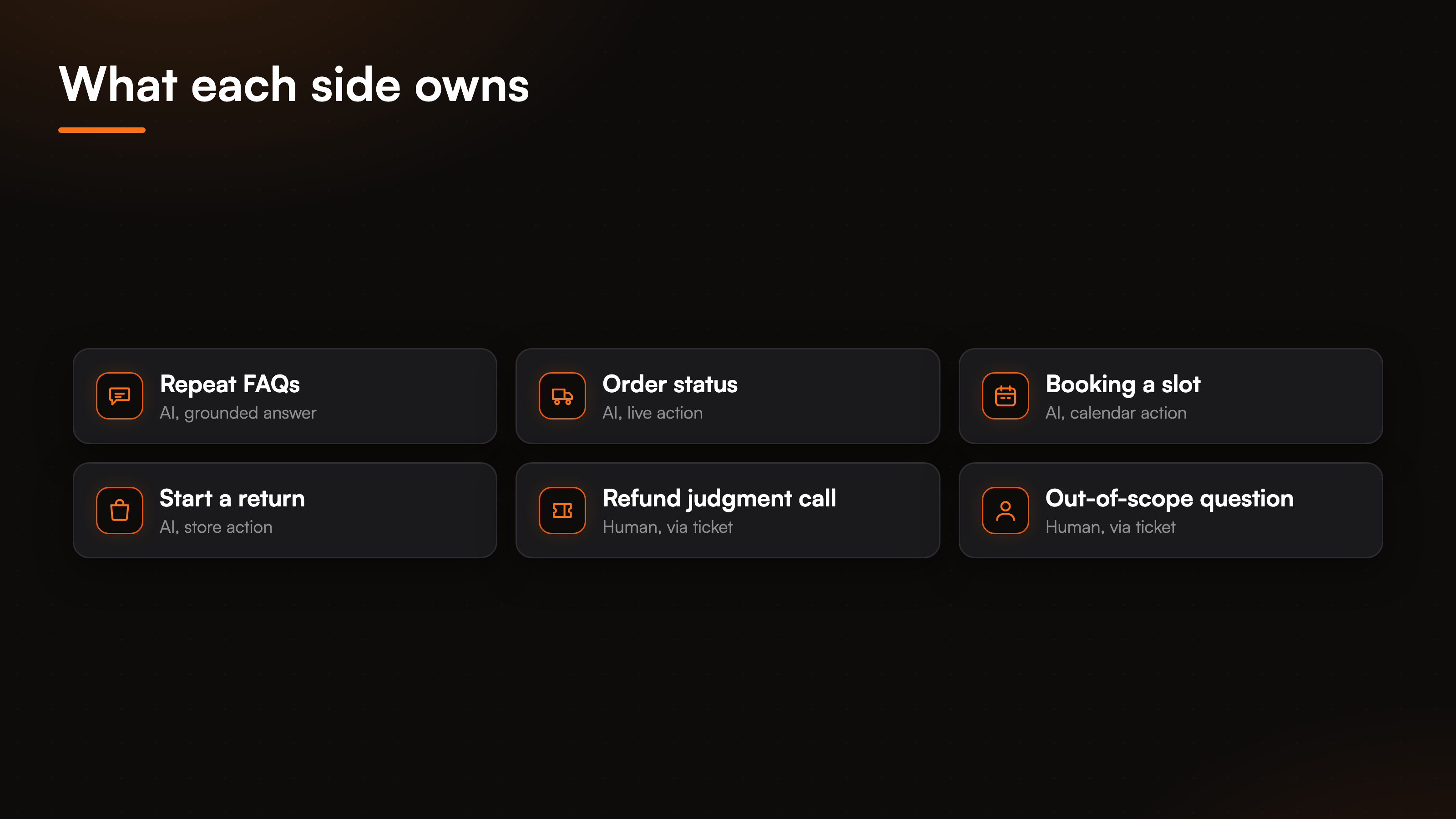
Here is the split. On one side sits everything repetitive and rule-bound: the same shipping question fifty times a day, an order status a shopper could look up, a booking that follows fixed availability. That is the AI's territory. On the other side sit the messages that need a person: a refund that breaks policy, an upset customer with a tangled history, a question no document answers. Those belong to your team.
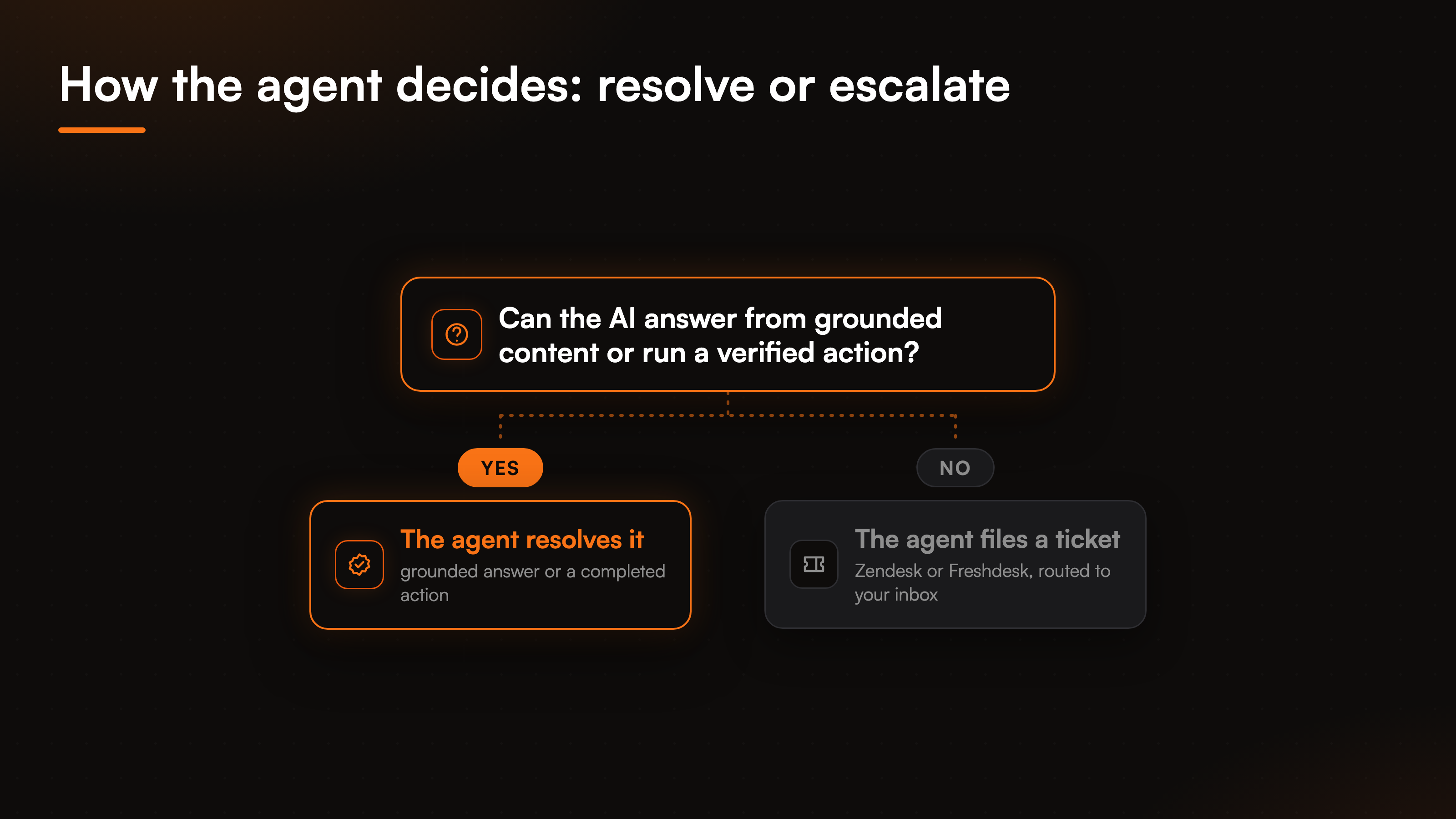
The agent decides which side a message falls on in the moment. It checks whether it can answer from the business's own content or run a verified action. When it can, it resolves the request there and then. When it cannot, it stops instead of guessing, and it opens a ticket. Drawing that line clearly is what keeps a hybrid setup honest rather than a bot that bluffs until a frustrated customer gives up.
What the AI handles without a human
The AI's half of the work is wider than a plain FAQ bot. It answers from your uploaded docs, your crawled site, and your manual edits, and it declines when a question sits outside that content rather than inventing a policy. That grounding is what lets the widget close a repeat question on first contact instead of paraphrasing something it never read.
Then there are the actions. The agent runs 29 prebuilt actions across 8 connectors, so it can check a live order, book a slot, or start a return instead of only pointing at a help page. Account-specific actions run only behind a verified visitor identity, with the email and name pinned from a signed token, so the agent acts for the right person or not at all. Those agentic actions sit on the Pro and Business plans, while grounded answering is available from the Free tier up. Automating the repeatable requests is most of what any customer support automation project sets out to do, and it is a large slice of a queue that never needs a person.
Where a human has to step in
No amount of grounding covers the cases that need a person, and pretending otherwise is how bots earn their bad reputation. A few kinds of message should always reach your team. The first is a judgment call: a goodwill refund outside the written rule, an exception only a manager can approve. The second is anything the knowledge base simply does not hold, where the honest move is to decline and escalate rather than improvise. The third is the customer who plainly asks for a human, which the agent should treat as a valid request, not a failure to argue past.
I would rather the agent escalate one question too many than fake its way through a refund it has no authority to grant. A support experience earns trust when the bot knows its own edges. That is the human half of hybrid support, and it reads less like a fallback and more like a deliberate lane.
How the baton passes: a ticket, not a live transfer
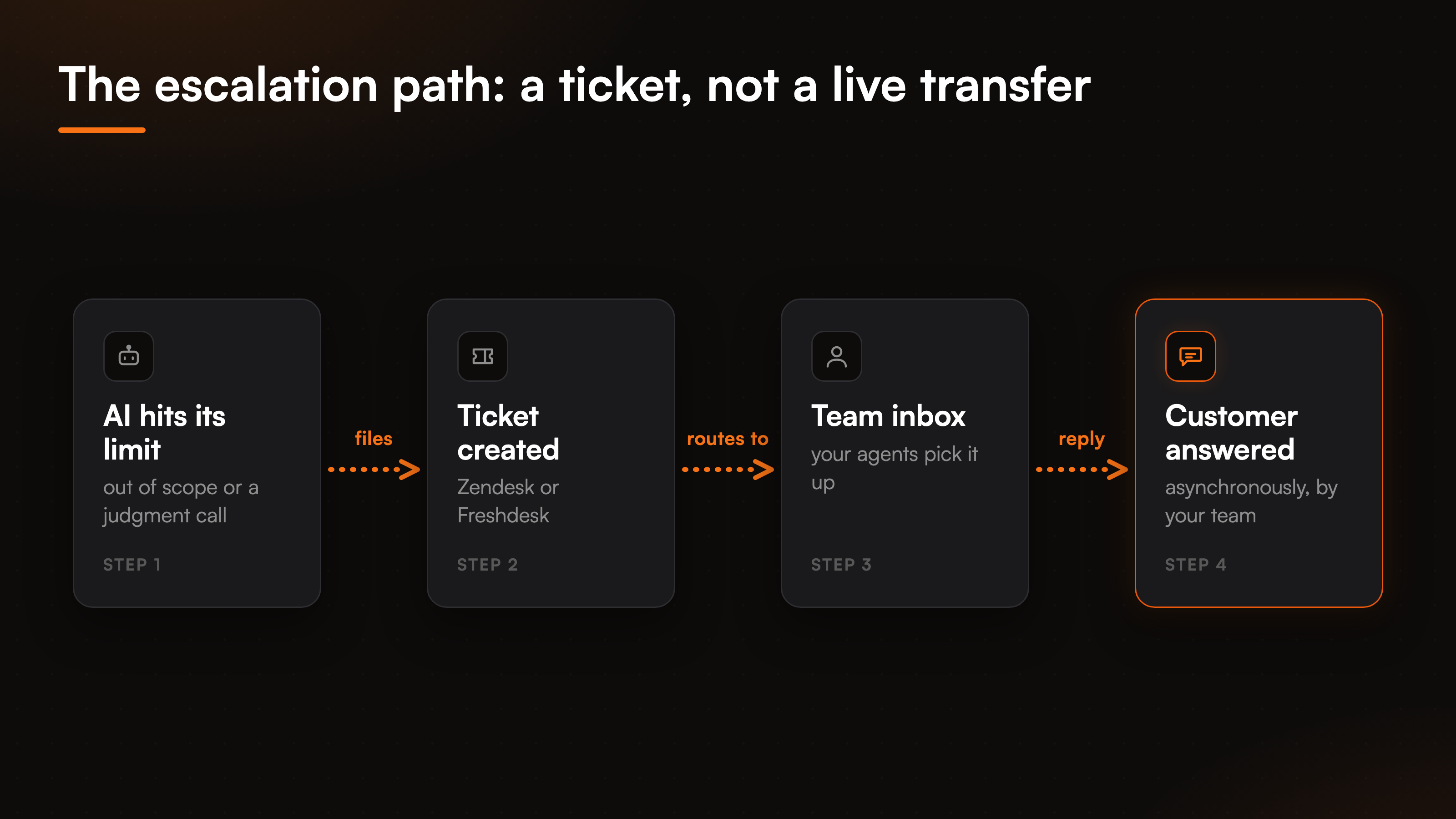
This is where our model diverges from the live-chat pitch. When the agent escalates, it does not drop the visitor into a queue to wait for whoever is online. It files a ticket in Zendesk or Freshdesk and routes it straight to your team's inbox. Your agents answer on their own schedule, through their own tools, and the reply reaches the customer asynchronously.
The trade is deliberate. A live transfer looks good in a demo and falls apart at 2am, on a weekend, or the moment every agent is already busy, leaving the customer staring at a spinner. A ticket never strands anyone. It captures the full conversation the AI already had, so your team opens it with context instead of asking the customer to repeat the whole story. If you want the mechanics of that step, the ticket creation actions post breaks it down. And because the widget lives only on your website, this stays a web-to-ticket flow rather than a scramble across five channels.
The other place humans stay in the loop
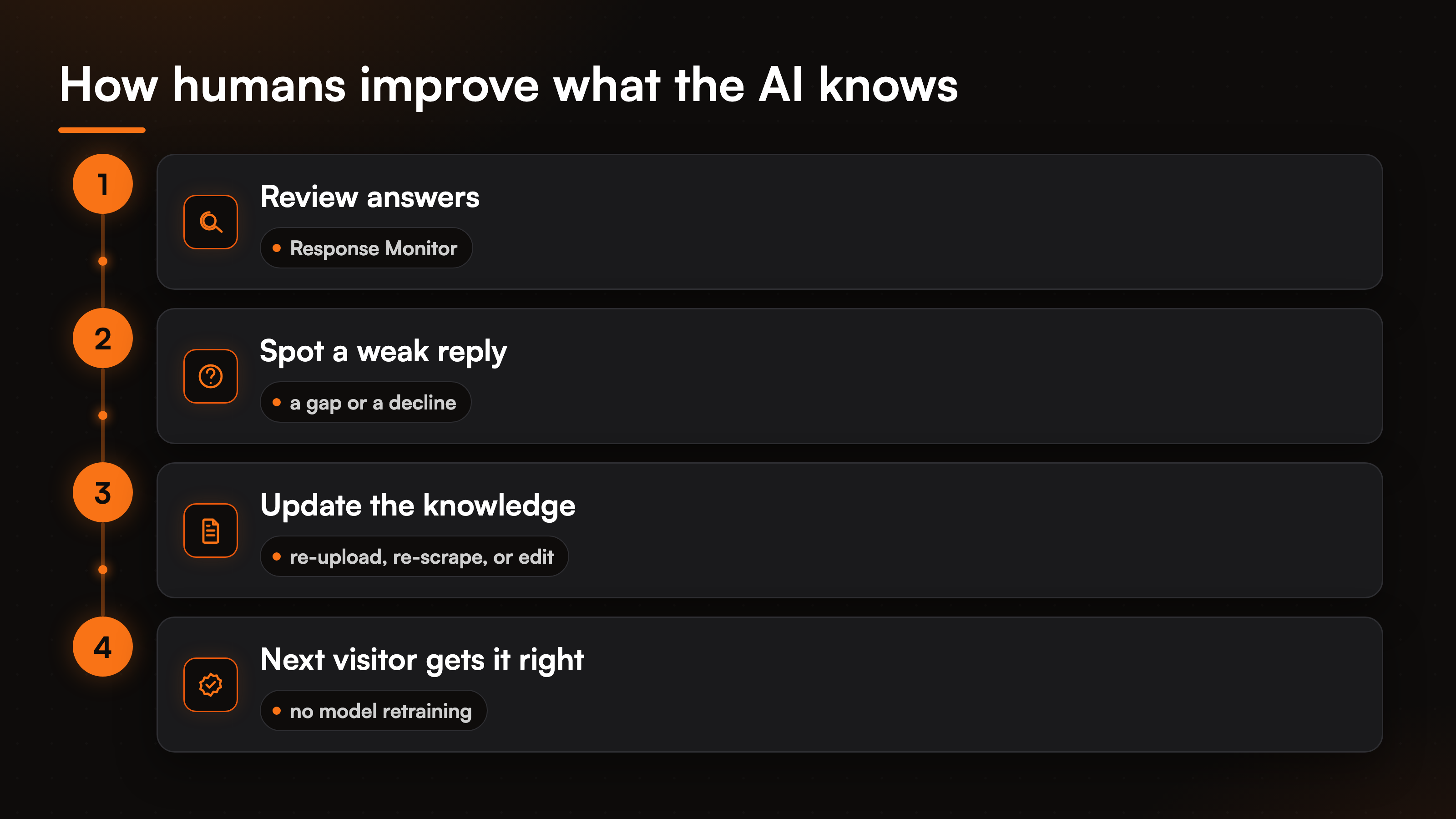
Escalation is the visible half of the human role. The quieter half is teaching. The agent does not learn on its own, and we made that a deliberate choice: a bot that silently rewrites its own answers is a bot you cannot audit. Instead, people review what it said in the Response Monitor, spot the answers that came out weak or declined too often, and fix the source. Fixing the source means re-uploading a document, re-crawling a page with change detection, or editing an entry by hand. The next visitor who asks gets the better answer, with no model retraining in sight.
This is human-in-the-loop applied to knowledge rather than to a single chat. It keeps a person accountable for what the AI says, which matters more once the same agent is also taking actions on real accounts. The primer on AI customer service covers where that split between machine and person usually lands.
Why we skip the live chat queue on purpose
Plenty of tools promise a live agent handoff, where the bot warm-transfers the visitor to whoever is available. It demos beautifully. In daily use it needs enough staffed agents to answer instantly, across every hour your site gets traffic, or the promise breaks. Most teams cannot cover that, so the live queue turns into a waiting room with a spinner.
We chose the ticket route because it degrades gracefully. Nobody gets stranded waiting for a human who is offline, the conversation carries its full context into your existing helpdesk, and your team works the queue on a rhythm they control. If you are weighing the human side of a website bot, the deeper look at an AI chatbot with human handoff sits right next to this one. And because the widget runs only on your site, there is one channel to reason about, not a sprawl of inboxes.
FAQ
Does BestChatBot transfer customers to a live agent?
No. When the AI cannot resolve a request, it files a ticket in Zendesk or Freshdesk and routes it to your team's inbox, and your team replies asynchronously. There is no live-chat queue and no warm transfer to an online agent. The trade is that nobody waits on hold for a human who might be offline.
What makes support hybrid if there is no live handoff?
Hybrid describes the division of labor, not a live chat button. The AI resolves the grounded questions and runs the account actions, while people handle the judgment calls that reach them as tickets. Both halves work on the same conversations, just at different moments and through different tools.
How does the AI decide what to escalate?
It checks whether it can answer from your own content or complete a verified action. When it can, it resolves the request. When the question sits outside your knowledge base, breaks a policy, or the customer asks for a person, it declines to guess and opens a ticket instead.
Do the humans train the bot automatically?
No. There is no autolearning. People review answers in the Response Monitor and improve the knowledge by re-uploading, re-crawling, or editing content by hand. That keeps a person accountable for what the agent says rather than letting it rewrite itself.
Which plans include the ticket escalation and actions?
Grounded answering is available from the Free tier up. The agentic actions, including creating a ticket in Zendesk or Freshdesk and the rest of the 29 actions across 8 connectors, come with Pro and Business. So the live account actions and the connector-based ticket handoff sit on the paid tiers, while the grounded answering that resolves most questions does not.
Hybrid support works when each side does what it is actually good at: the AI clears the volume, and a ticket carries the rest to people who can weigh it. If you want to see which plan unlocks the connector actions and the ticket handoff, start with the AI support pricing guide, or keep reading through the rest of our AI support agent resources.