
AI Chatbot From Your Docs
An AI chatbot from your docs answers visitor questions using your help center, PDFs, and FAQs. See the architecture, the sources that work, and the refresh cycle.
Article body
An AI chatbot from your docs is a chatbot whose answers come from your existing documentation: help center articles, FAQ pages, product manuals, policy PDFs, anything you have already written for customers. The bot reads those documents at the moment of each question, retrieves the relevant passage, and generates an answer using that passage as the source. Nothing in the model's general training data leaks into the answer. The result is a support widget that quotes your real policies, your current pricing, and your actual feature list, rather than a model's guess at what those things look like. This page covers how the architecture works, what kinds of docs feed it well, and the refresh cycle that keeps it accurate over time.
What "from your docs" actually means
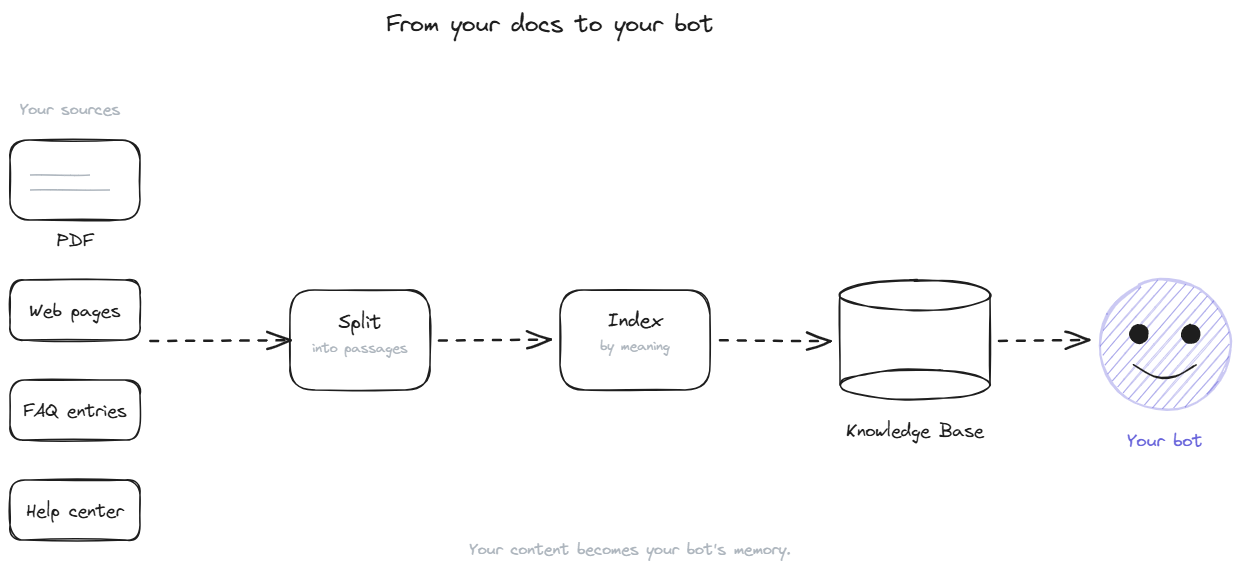
In technical terms, a docs-based chatbot uses retrieval-augmented generation. The language model itself is not retrained on your content. Instead, your documents are processed once into a searchable format and stored in a vector database. When a visitor asks a question, the system finds the passages closest in meaning to the question, hands them to the model along with the question, and asks the model to answer using only those passages.
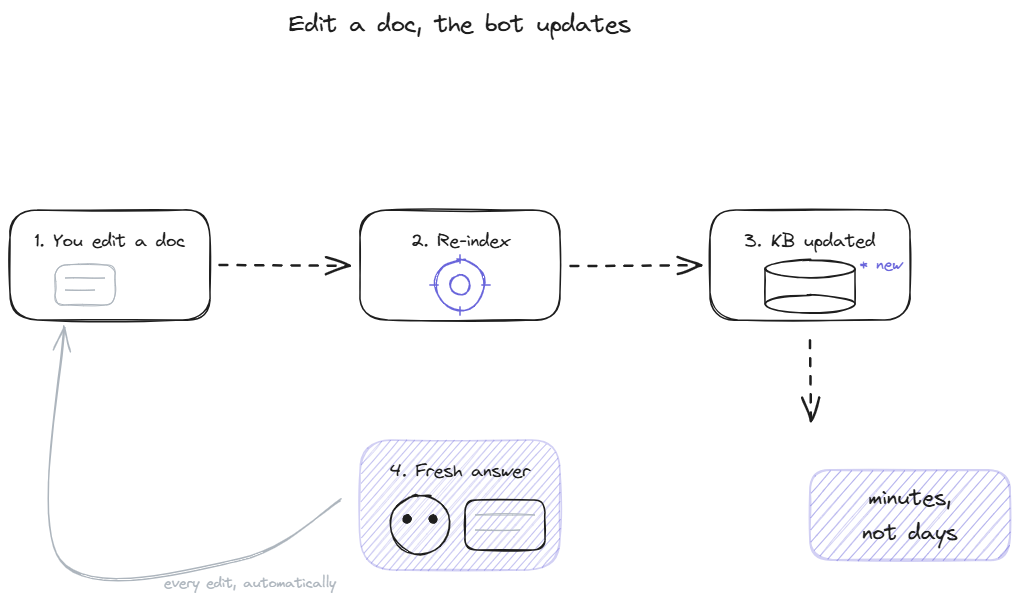
The phrase "from your docs" is therefore architectural, not metaphorical. The bot's outputs are constrained at runtime to information that came from your sources. There is no separate training cycle, no fine-tuning, no waiting for the model to learn new content. Edit a doc, the change propagates to the bot within minutes. Remove a doc, the bot can no longer quote from it. The knowledge base is the bot's memory and the only memory that affects its answers.
This is why vendors talk about "training time" in minutes rather than days. The training is mechanical: ingest, chunk, embed, store. The work that takes weeks is curating the source content itself, not running the bot's setup pipeline.
Why docs are better source material than other content
A documentation chatbot grounded in help center articles outperforms a generic AI assistant on visitor support questions because the source material is closer to the question. Generic AI was trained on the public internet, which means it knows about your category but not about your product. It knows what a refund policy is, but not what yours says. It knows that SaaS companies usually have tiered pricing, but not what your specific tiers cost this month.
Docs solve this by being the source of truth. A help center article on refunds states your exact policy. A pricing PDF states your current numbers. The bot quoting those sources is, by construction, accurate to your business, because the source content is. The question becomes whether your source content is itself accurate, which is a smaller and more solvable problem than trying to retrain a generic model on private data.
The other reason docs work well is structure. A help center article is written for end users, with headings, short paragraphs, and one concept per section. That structure maps naturally onto the retrieval system, which pulls passages, not entire articles. Internal documents written for engineers, in contrast, mix jargon and assumed context that retrieval cannot use cleanly. The shape of the source matters as much as its accuracy.
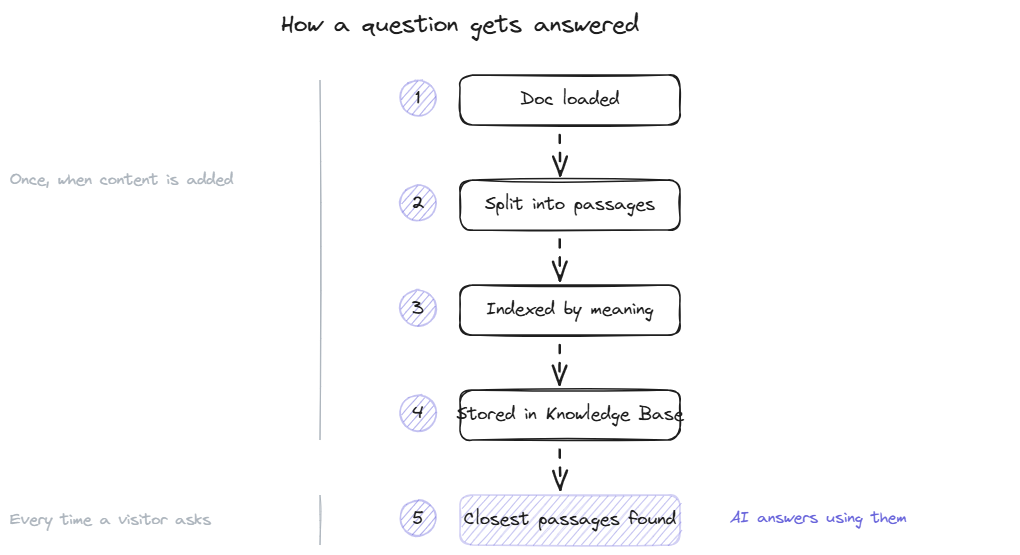
A doc lands in the system and the first thing that happens is chunking. The document text gets split into passages, usually 200 to 800 tokens each, ideally on natural boundaries like section headings or paragraph breaks. Each chunk is a self-contained unit that will be retrieved or not retrieved as a single piece.
Each chunk gets converted into a vector embedding using a multilingual embedding model. The embedding is a numerical representation of the chunk's meaning, typically a list of several hundred or several thousand numbers. The embeddings get stored in a vector database alongside the original text and metadata (which document, which section, when last updated).
At query time, the visitor's question goes through the same embedding process. The vector database does a similarity search to find the chunks whose embeddings are closest to the question's. The top 3 to 5 chunks get passed to the language model along with the question. The model generates an answer using only those chunks as source material.
BestChatBot layers a knowledge graph on top of pure vector search, tracking entities like product names, plans, and features across documents. The graph sharpens retrieval for questions that touch multiple concepts, where pure similarity search alone tends to surface partially-relevant passages.
What works as a "doc"
The system accepts more than just formal documentation. Four source types cover almost every team's content.
- PDFs of any kind: product manuals, pricing tables, whitepapers, policy documents, security overviews. Upload them once and the bot can quote from them. PDFs work especially well for stable content that does not change often.
- URLs and sitemaps for content that lives on a public page. Point the bot at your help center root or sitemap, and it scrapes the content on a schedule. The advantage is that the bot stays in sync with what visitors see on the public site automatically.
- Manual FAQ entries for content that does not exist as a formal doc yet. Type the question and the answer into the admin panel. Useful for recently launched features, product-specific edge cases, or anything that has not been written up properly.
- Help center exports from platforms like Zendesk Guide, Intercom Articles, or HelpScout. Some platforms support direct sync via API. Others require periodic export and re-upload. The help center integration page covers the platform-specific options.
The same docs that power a web widget can also feed a Discord deployment if your team runs both channels. The Discord docs bot page covers that case for teams managing community support alongside their website widget.
A documentation chatbot is only as current as its last sync. Documentation changes constantly in active products: new features ship, pricing tiers shift, integrations get added or deprecated. A bot that was indexed in June and never refreshed gives June answers in December.
Two refresh patterns work in practice. Scheduled re-indexing runs on a fixed cadence, daily for fast-moving content like changelogs and pricing pages, weekly for stable content like policy documents and product overviews. Most platforms handle this automatically once the source is configured. Manual re-indexing is also usually available for urgent changes that cannot wait for the next scheduled run.
The second pattern is webhook-triggered re-indexing. When a help center article is published or edited, the platform fires a webhook that triggers the bot to re-index that specific document immediately. This is the cleanest setup but requires that your help center platform supports webhooks and that the bot vendor supports receiving them.
Either way, the goal is the same: the lag between a doc edit and the bot reflecting it should be measured in minutes, not days. A 24-hour lag is acceptable for stable content. A week-long lag means the bot is consistently behind the public site.
FAQ
- Is "from your docs" the same as fine-tuning the model? No. Fine-tuning - modifies the model's weights based on additional training data, which is expensive and slow. A docs-based chatbot leaves the model unchanged and instead retrieves passages from your documents at query time. The bot's behavior shifts with each doc edit, not with a separate training run.
- How many docs do I need to start? Enough to cover the top 30 to 50 most common visitor questions. For most SaaS products this is a help center of 30 to 80 articles plus a few PDFs. Volume past that point matters less than coverage of the actual question distribution. A focused 40-article set beats a sprawling 400-article set with duplicates.
- What if the docs contradict each other? The bot may retrieve either passage depending on which scores higher on similarity, producing inconsistent answers across visits. The fix is upstream: find and resolve the contradictions in the source content before relying on the bot. Most platforms surface these conflicts during retrieval logs, but the resolution is a content decision.
- Can the bot pull from multiple help centers or doc sites? Yes. The knowledge base can ingest content from any number of sources simultaneously and treats them as a unified pool. Useful for teams running separate documentation for different product lines or different regions.
- How do I know which doc the bot quoted? Well-built systems log the source passages used to generate each answer, so you can audit any specific response and verify it traces back to a real document. Some platforms also surface citations to the visitor in the chat itself. Source visibility matters more for some industries than others; financial, legal, and healthcare contexts benefit most.
A chatbot built from your docs is the foundation of every credible AI support tool in 2026. The architecture is well-understood, the cost is bounded, and the answers stay locked to content you control. To see pricing and pick a plan, head to pricing.
Related: qualifying leads with AI.