
How to Train a Support Chatbot
Train a support chatbot in 5 steps: gather sources, clean content, load into the KB, test with real questions, iterate from live conversations.
To train a support chatbot in 2026 is not what most people picture. The word "train" suggests fine-tuning a model, running gradient descent on a dataset, or some other heavy machine-learning process. None of that happens in a typical support chatbot rollout. What "training" actually means is curating the knowledge base the bot reads from at the moment of each question. The bot's quality is a function of the content you feed it, not a function of the model under the hood. This page covers the 5 steps that produce a bot that answers correctly, plus the mistakes that show up in 9 out of 10 first rollouts.
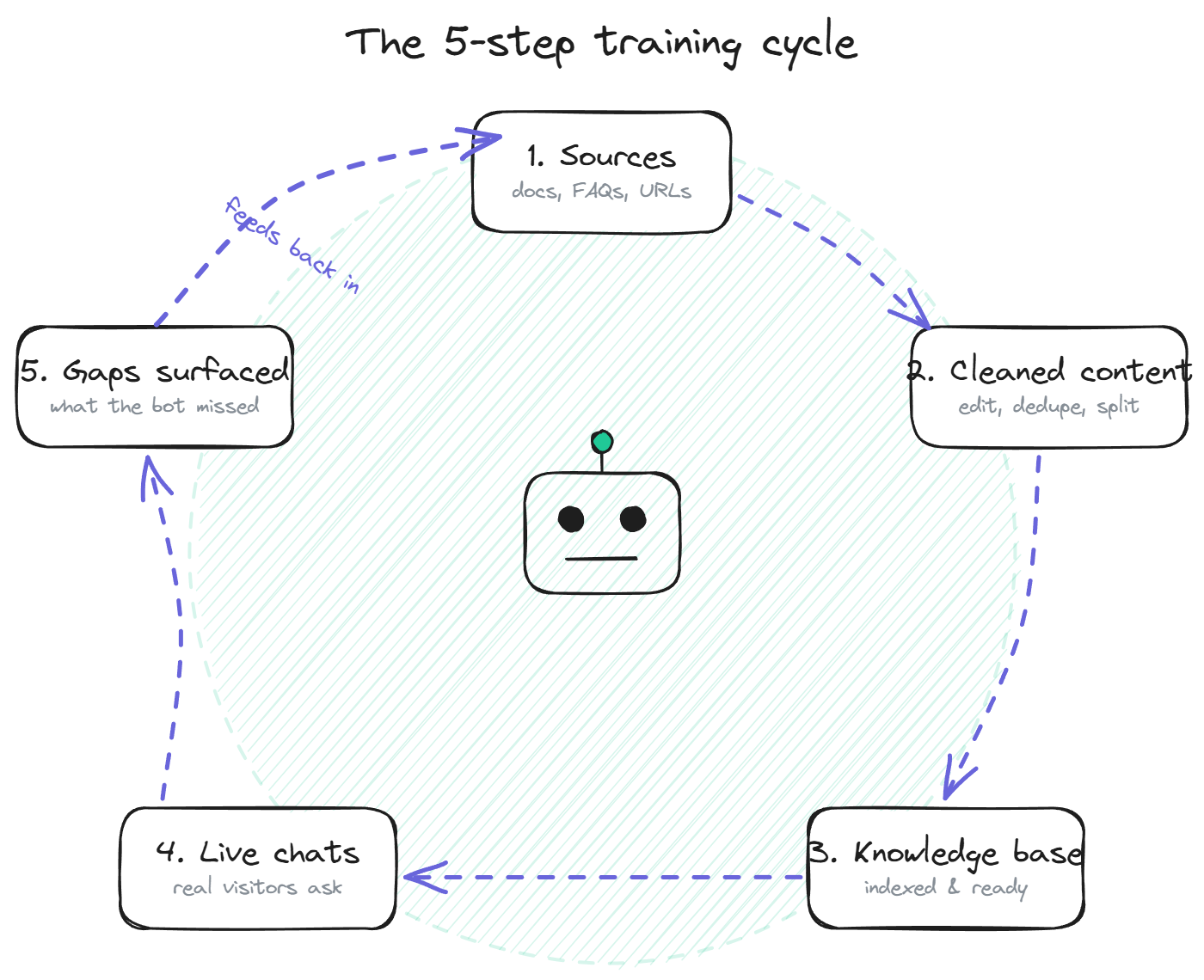
What "training" a support chatbot actually means
A support chatbot trained on your content is using retrieval-augmented generation. Your documents sit in a knowledge base. When a visitor asks a question, the bot retrieves the most relevant passages from the knowledge base and hands them to the language model, which generates the answer using only that content. The model itself is unchanged. The training is mechanical, fast, and reversible.
This matters because it changes how you think about the work. You are not training a model; you are curating a content library that the model will quote from. Every doc you add improves coverage. Every doc you remove or edit changes the bot's answers immediately. The cycle is fast enough that mistakes are cheap to fix and iteration becomes the main activity, not the initial setup.
Step 1: Gather your sources
The first step is identifying every piece of content the bot should be able to answer from. For most SaaS teams, the source list looks consistent across companies. The help center articles, the product documentation site, the FAQ page, any PDFs that customers ask about regularly (pricing tiers, integration lists, security overviews), the changelog if it is public-facing, and the most-referenced blog posts on how-to topics.
What does not belong in the source list is just as important. Internal Slack threads, engineering design docs, archived blog posts that contradict current behavior, marketing copy written to persuade rather than to explain, and anything that has not been read by a human in the last 12 months. The bot will quote whatever you feed it, including bad content.
A practical exercise: open your help center, pull every article, and tag each one as keep, edit, or delete. Most teams find that 20 to 30% of existing articles fall into the delete pile. That's the cheapest quality improvement available.
Step 2: Clean and structure the content
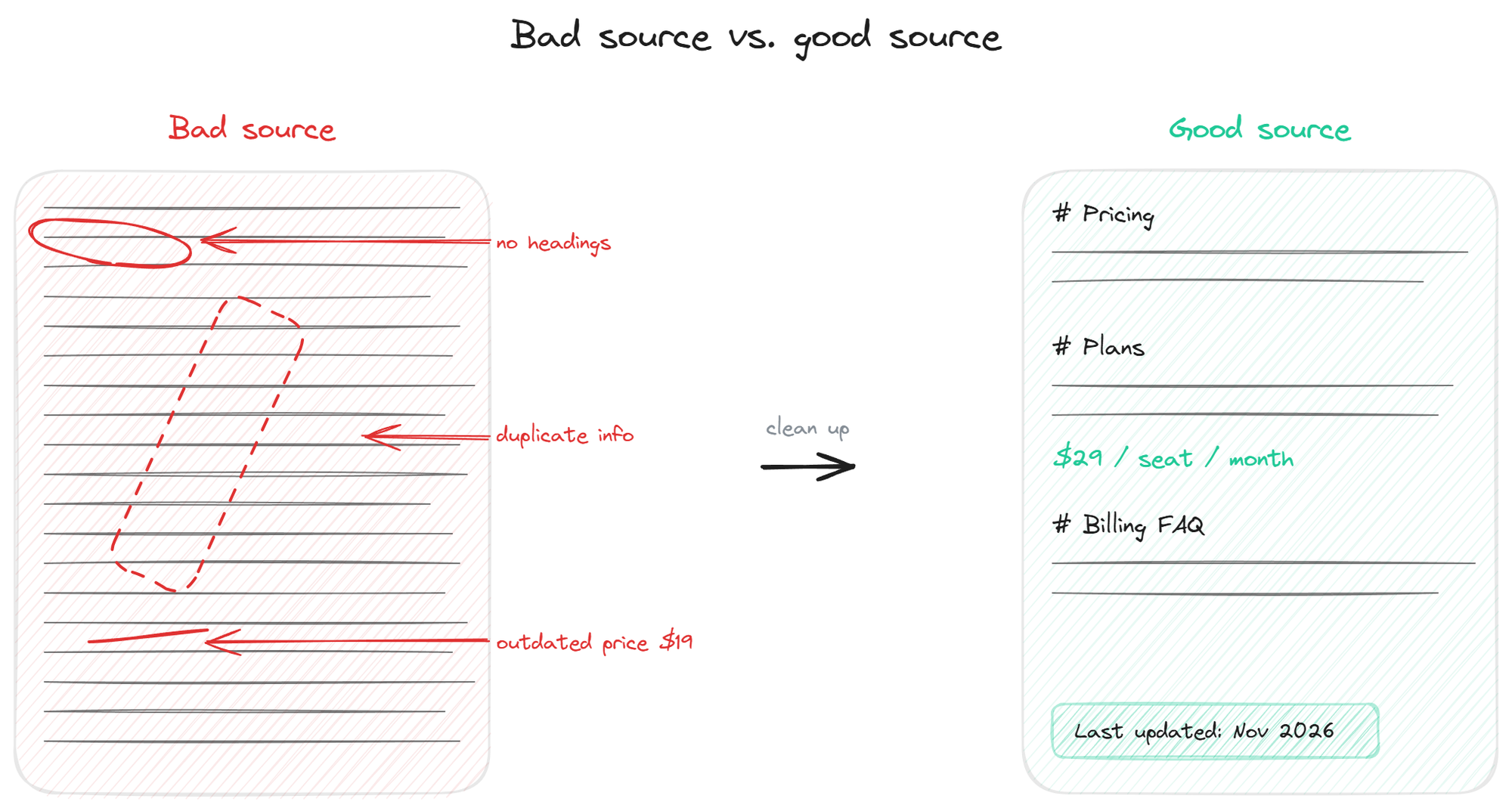
Once the source list is in place, each document needs structure that retrieval can work with. The retrieval layer pulls passages, not entire articles, which means how you split the content matters. Long articles need clear section headings every 200 to 500 words. Each section should answer a specific question or cover a specific topic. Sections that mix multiple topics produce passages that the bot retrieves for the wrong queries.
The cleanup also covers contradictions. If your pricing page says $29 per seat and your FAQ says $39 per seat, the bot will retrieve whichever scored higher and produce inconsistent answers across visits. The fix is upstream: resolve the contradiction in the source content before indexing. Most teams discover 5 to 15 contradictions of this kind during the audit. None of them are dramatic, but together they cause most of the "the bot gave me wrong info" complaints.
Tone matters too. Help center articles written in formal corporate prose produce answers that read as stiff and impersonal. Articles written in plain, direct language produce answers that read as helpful. The bot inherits the voice of the source.
Step 3: Load into the knowledge base
The technical step. Most platforms accept 3 source types: file uploads (PDFs, text files), URL or sitemap scraping for web content, and manual FAQ entries typed directly into the admin. Use whichever combination fits your existing content layout.
For URL scraping, point the bot at the help center root URL or sitemap and let it index everything underneath. Configure the refresh schedule (daily for fast-moving content, weekly for stable content) so updates propagate automatically. For uploaded files, drop them into the admin panel and let the system process them. For manual entries, use these for product-specific edge cases that don't have a doc yet.
After indexing, the bot can answer from the content within minutes. The validation comes in the next step.
For the architectural side of how the indexed content becomes retrievable, the from docs page covers the embedding and storage layer in plain language.
Step 4: Test with real questions
The temptation here is to test the bot with a handful of obvious queries and call it done. That under-samples the actual support workload. The honest test uses real historical questions.
Pull the last 200 support tickets from your help desk. Strip the names. Feed each ticket's main question to the bot and tag the response: correct, partially correct, wrong, or "I do not know." A typical first-pass distribution lands around 40% correct, 25% partial, 20% wrong, 15% deflected. That's the starting baseline, not the final result.
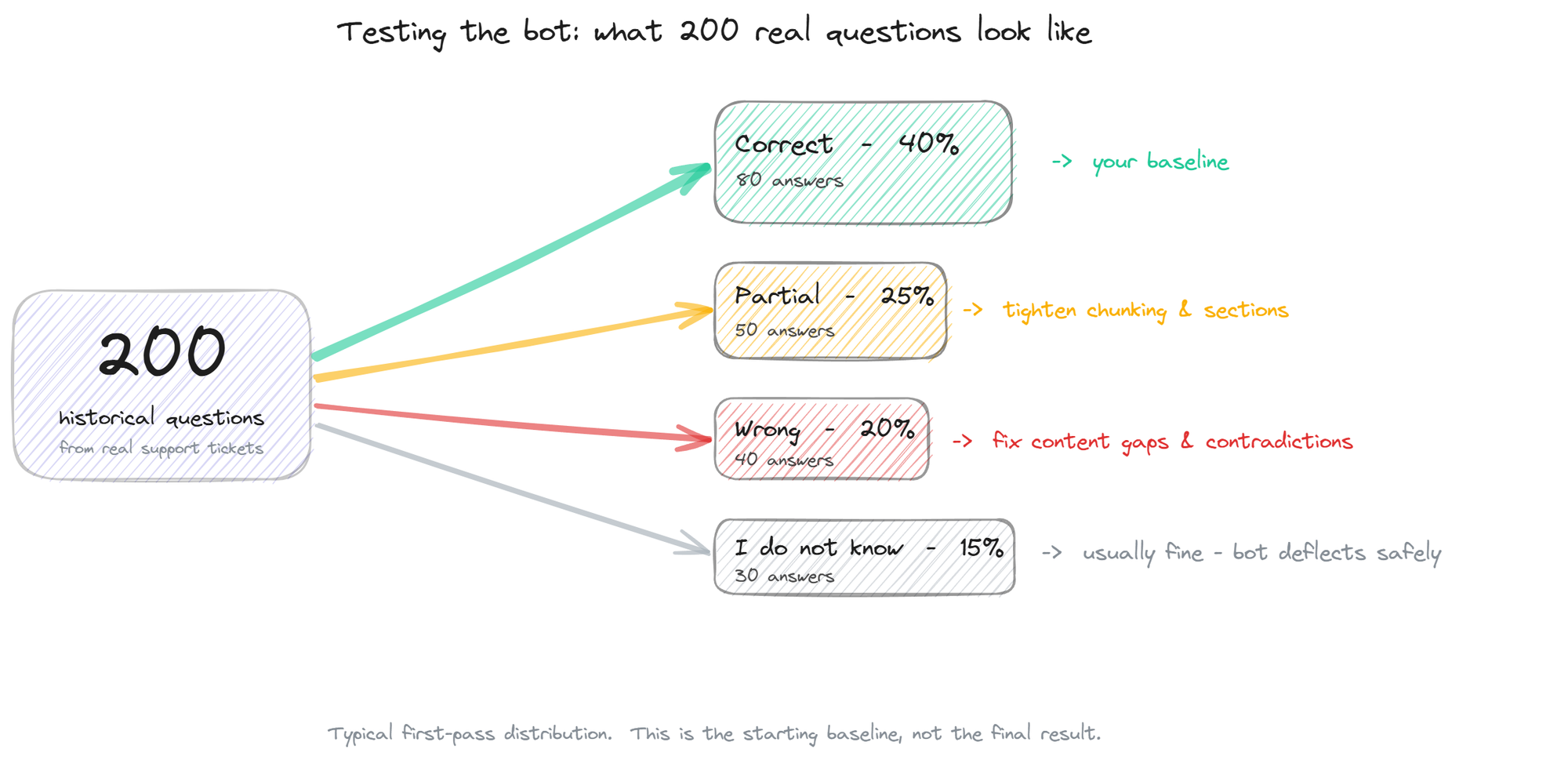
Wrong answers point to content gaps or contradictions you missed in Step 2. Partial answers usually mean the retrieval picked the right document but the wrong section, which is fixable by tightening the chunking or rewriting the source. "I do not know" answers are usually fine; the bot is doing its job by deflecting questions it cannot confidently handle. Plan another pass through the content based on the test results, then re-test. The QA the bot page covers the testing methodology in more depth.
Step 5: Iterate from live conversations
The training is not finished at launch. The bot's coverage will plateau within a few weeks unless you have a mechanism for capturing the questions it could not answer and feeding the answers back into the knowledge base.
Two mechanisms work in practice. The manual review is a weekly 30-minute pass through the bot's conversation log, focused on the "I do not know" cases and the cases where visitors followed up with "actually that's not what I meant." Each one is a content gap. Write the missing doc, edit the existing one, or add a manual FAQ entry, and the bot has the answer the next time.
The automated mechanism is the supervised autolearning loop. When the bot fails to answer a question and a human handles it through another channel, the system captures the exchange, runs a validation pipeline (relevance, novelty, quality, on-topic), and adds the validated answer back to the knowledge base. This compounds over time: month 1 coverage of 40% becomes month 3 coverage of 70% without anyone running a separate training session.
BestChatBot's web widget includes the autolearning loop as standard, capturing the gaps that real visitor traffic surfaces and feeding them back into the knowledge base after validation. The result is a bot that gets noticeably better between every weekly content review.
Common training mistakes
Three mistakes show up in almost every first rollout. The first is the one-time upload mentality: load the content once at launch, never refresh, never iterate. The bot decays as the source content goes stale. The second is over-feeding: dumping every internal doc into the knowledge base on the theory that more is better. The bot starts quoting jargon and contradicting itself. The third is skipping the audit and going live on a help center full of duplicates. The bot produces inconsistent answers and nobody figures out why for weeks.
The fix for all three is the same. Train is not a verb you do once. It's a verb you do every week, on a small list of clear tasks: review the gap log, edit a few articles, refresh the indexing schedule, re-test the categories that drifted. 30 minutes weekly produces a bot that climbs from launch baseline to genuinely useful within a quarter.
FAQ
How long does training take? The initial cycle (Steps 1 to 4) takes 1 to 2 weeks for a team with reasonable existing documentation. The ongoing training (Step 5) takes 30 minutes a week indefinitely.
Do I need to write new content to train the bot? Not usually. Most teams already have enough content; it just needs cleanup. Writing new articles becomes useful in Step 5, when the gap log surfaces topics the docs do not cover yet.
Can I train the bot without a help center? Yes, with manual FAQ entries and uploaded PDFs. The bot needs source content to ground on, but it does not need a polished help center site. A list of question-answer pairs typed into the admin is enough to start.
What happens when I update a document? On platforms with scheduled re-indexing, the bot picks up the change automatically on the next refresh cycle. Manual re-indexing is also usually available for urgent updates.
How do I know the training is working? Three numbers tell you. Resolution rate on bot conversations (target 50%+ by month 3), the count of "I do not know" responses (should shrink week over week if you're reviewing them), and the count of customer complaints about wrong answers (should approach zero). For pricing details, see plans.