
FAQ Chatbot for Your Website
An FAQ chatbot for website support answers repetitive questions 24/7 from your existing docs. See when it beats a static FAQ page and how to build one.
Article body
An FAQ chatbot for website support is the answer to a specific problem: 60-80% of incoming support tickets are variations of the same dozen questions, and a static FAQ page is not getting read. The chatbot reads the FAQ on the customer's behalf, in the format they actually want (a conversation, not a list of headings), and produces an answer matched to what they actually asked. Done well, it converts a category of support work from "expensive humans typing the same reply for the 400th time" to "free, instant, and consistent."
What an FAQ chatbot does that a static FAQ page does not
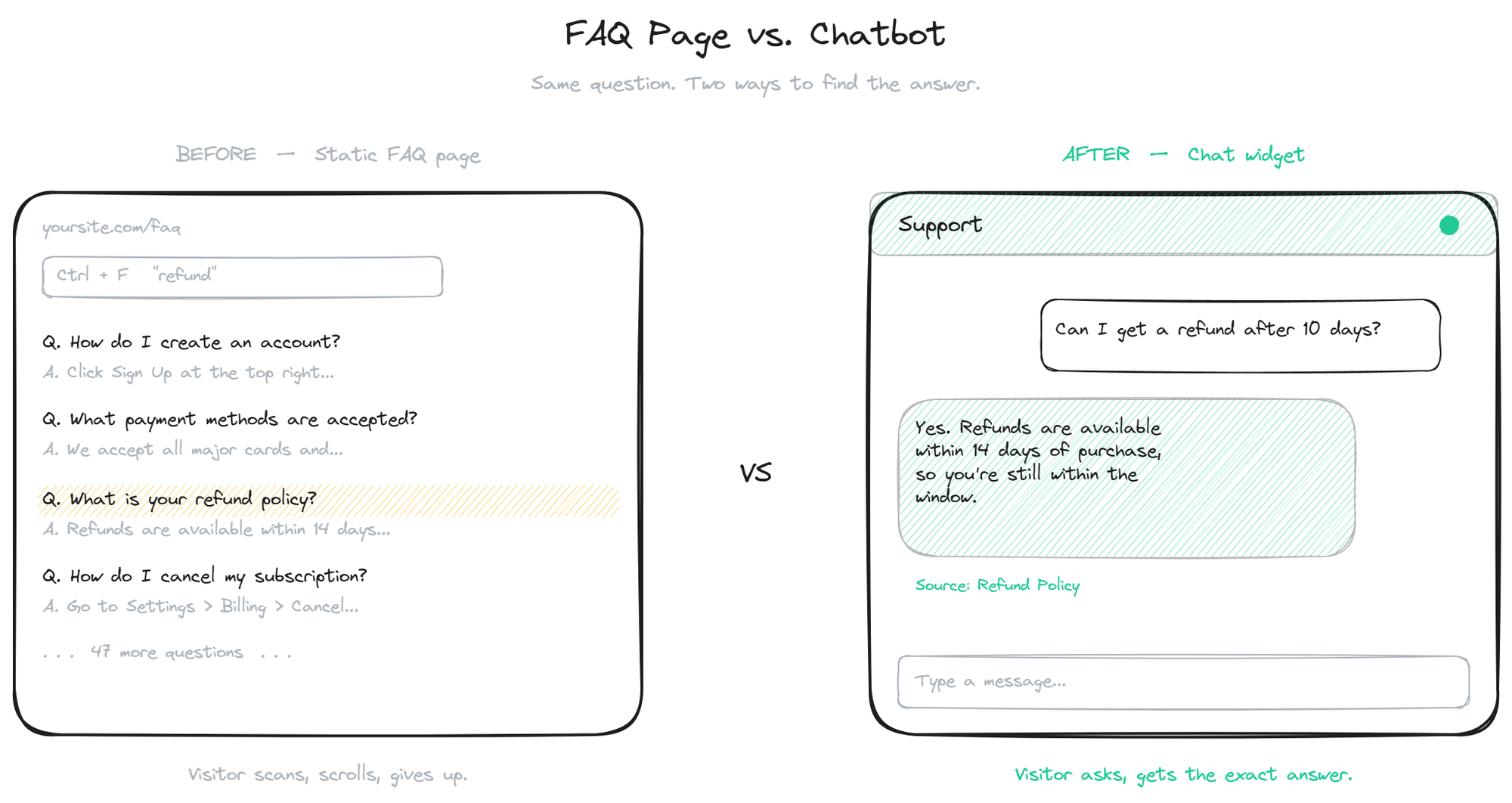
The traditional FAQ page is a wall of text. It assumes the customer knows the right keyword to scan for, has the patience to scroll, and reads English well enough to recognize a paraphrased version of their question. About a third of visitors meet all three conditions. The other two-thirds either email support or leave.
An FAQ AI chatbot collapses that work. The customer types the question in their own words, the bot matches against the FAQ content underneath, and returns the specific answer. There is no scrolling, no Ctrl+F, no guessing at terminology. From the customer's perspective, the difference between a 30-second resolution and a 30-minute email round trip is whether the bot is there.
The other thing an FAQ chatbot does that a static page cannot: it tells you what is missing. Every question the bot cannot answer is a signal that either the FAQ does not cover that topic, or the customer is asking about it in a way the existing content does not match. Both are useful data; neither shows up in static page analytics.
When an FAQ chatbot is the right answer
This kind of bot fits a specific shape of support problem. The conditions where it works:
- Repetitive question volume. The same 10-50 questions account for most of the inbound. If your support inbox is a long tail with no clear repeats, the FAQ chatbot will not help much because there is no FAQ to encode.
- Stable answers. The answers do not change weekly. Pricing, return policies, shipping windows, plan features, account setup steps. Anything where the right answer is the same for every customer.
- Low risk of getting it wrong. Information questions, not account-specific questions. "How do I cancel?" yes; "Why was my account charged $43 extra last Tuesday?" no.
- Existing content to draw from. A help center, an FAQ page, a docs site, a few PDFs. The bot is only as good as what you point it at. With zero source content, the bot has nothing to ground on.
When all four are true, an FAQ chatbot is a high-leverage support investment. When two or fewer are true, you are better off fixing the underlying content problem before adding any bot.
The cases where this kind of bot does not help: complex troubleshooting that depends on the customer's specific configuration, account or billing questions tied to a single customer's data, and anything that requires real-time access to systems the bot is not connected to.
How to build one that actually works
Three things separate an FAQ chatbot that earns its place from one that turns into a complaint generator:
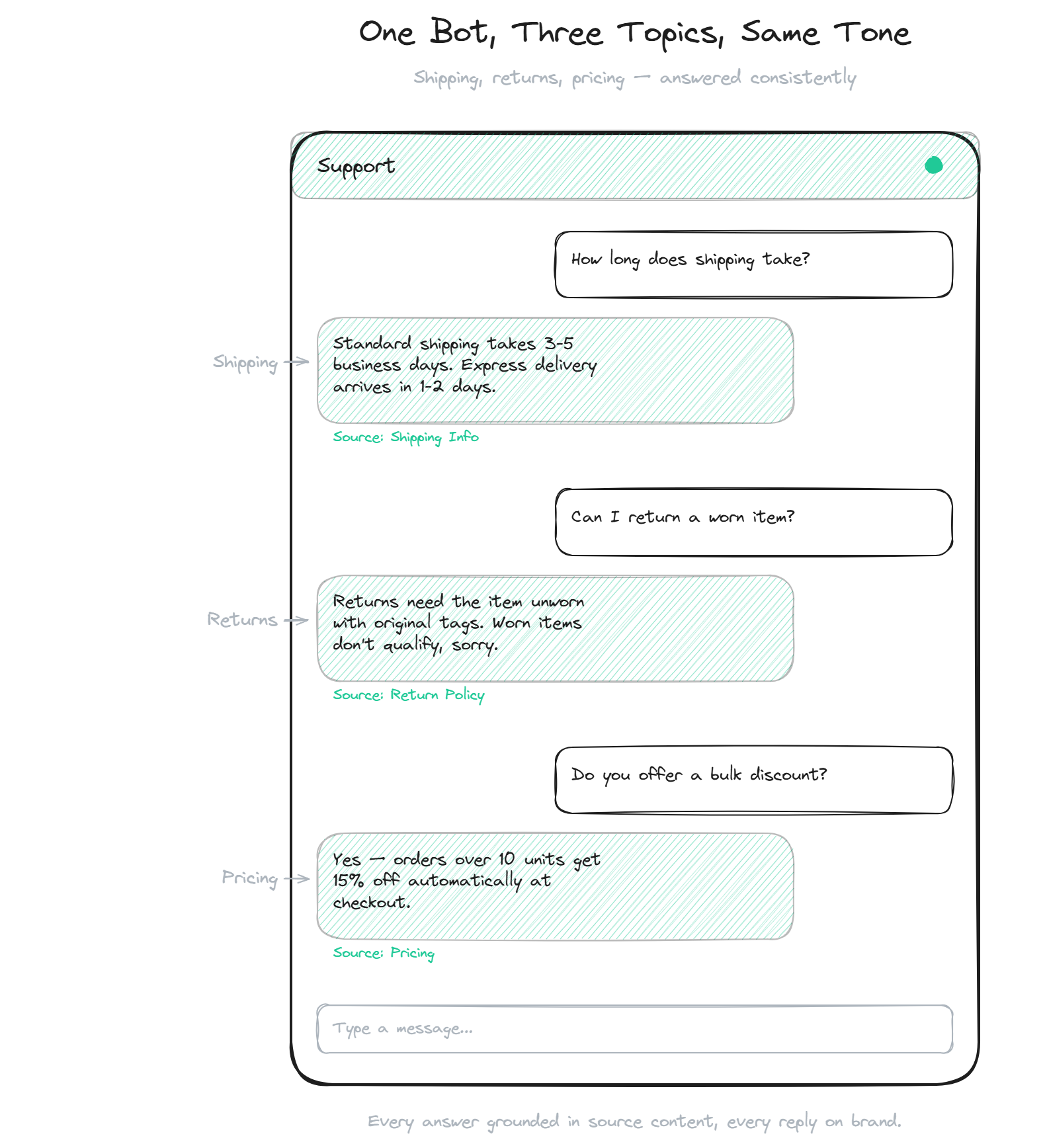
- Ground every answer in source content. The bot should not invent answers, even when the source is thin. If the FAQ does not cover the question, the bot should say so explicitly. The structural detail of how this works lives in the from your docs guide, which walks through how source documents become bot-ready content.
- Match the conversational tone to the brand. A self service chatbot that sounds like a corporate FAQ written in 2004 reads as cold. A chatbot that sounds like a person from your support team reads as helpful. The same answer in two different tones produces different CSAT.
- Show, do not just tell, what the bot can do. A first message like "Ask me anything about orders, returns, or shipping" sets expectations 10x better than "How can I help you today?" The visitor knows the scope, asks a question inside it, and gets a useful answer on the first try.
The FAQ-to-bot content audit
Most teams already have an FAQ. The audit is about turning that FAQ into bot-ready content. Three passes:
- Deduplicate. If two FAQ entries cover the same topic, merge them or pick one as canonical. The retrieval will otherwise surface whichever it matches first, which creates the appearance of randomness.
- Rewrite for direct answers. FAQ pages often hedge ("In most cases, returns are accepted within 30 days, although..."). Bot replies should answer cleanly. Rewrite to "Returns are accepted within 30 days. After 30 days, contact support for a case-by-case review." The bot will mirror the structure of the source.
- Expand the question side. An FAQ entry titled "Returns Policy" matches "what is your returns policy" but not "can I send this back" or "I bought the wrong size." Add the alternate phrasings either as separate FAQ entries or as part of the source content. Coverage of how customers actually ask matters as much as coverage of what they ask about.
This audit usually takes a day or two for a help center of 50-200 articles. It is the highest-ROI work in the whole project.
Measuring whether the FAQ bot is working
Four numbers tell you if it is doing its job:
- Resolution rate. What percentage of conversations end without the customer either escalating to email or leaving in apparent frustration. A target of 50-70% by month three is realistic for a well-built FAQ bot.
- "I do not know" rate. What percentage of questions the bot deflected. Some deflection is good (the bot doing its job). Excessive deflection (above 25-30%) means content gaps.
- Topic coverage. The list of question categories the bot handles well versus poorly. This is more useful than aggregate numbers because it tells you where to invest content effort next.
- Downstream ticket reduction. Did your support inbox volume actually drop after the bot launched? If yes, the bot is converting questions before they reach humans. If no, the bot is generating chatter without deflecting work, which usually means the chat is reaching customers who would not have emailed anyway.
For a deeper look at how an FAQ bot differs from a more capable AI agent that takes actions and not just answers, the chatbot vs AI agent comparison covers the spectrum.
FAQ
- How is an FAQ chatbot different from a regular AI chatbot? An FAQ chatbot is scoped to a specific class of question: information about your product, policies, and processes that is already documented somewhere. A more general AI chatbot might also take actions (look up orders, book demos, create tickets). The FAQ version is simpler to build, cheaper to run, and covers the highest-volume support category.
- Can the FAQ chatbot work without a help center? Yes, if you have any structured source content: a Notion FAQ, a Google Doc, a few PDFs, or even a list of question-answer pairs typed into the bot's admin. The bot needs source content to ground on; it does not need a polished help center site.
- How does the bot handle questions outside its scope? A well-built FAQ bot recognizes when a question is outside what it can answer and says so explicitly, ideally pointing the customer to the right next step (email, contact form, or a specific channel). A bot that tries to answer everything will hallucinate; a bot that knows its limits builds trust.
- Does an FAQ chatbot replace the FAQ page? No, and it should not. The FAQ page is still useful for SEO, for visitors who prefer to skim rather than chat, and for sharing direct links to specific answers. The chatbot is an additional access path, not a replacement.
- How long does it take to set up an FAQ chatbot? With existing FAQ content, one to two weeks including the content audit. Without existing content, add another week to write the first version of the FAQ itself. The technical install is usually the same day.
A working FAQ chatbot for website support takes the most repetitive support work off your team's plate, exposes the gaps in your documentation, and reads like a knowledgeable person rather than a search interface. When you are ready to add one to your site, get started and pick the tier that matches your traffic.
Once your FAQ bot is live, see the guide to styling and placing the chat widget.