
Discord Support Bot for Communities
Discord has become far more than a gaming platform. As of Q2 2025, it hosts over 231 million monthly active users across 28.4 million active servers, and 54% of its user base now engages in non-gaming activities — from developer communities and SaaS products to Web3 projects, creator ecosystems, and educational groups (Discord platform statistics, 2025). For many companies, Discord is not a secondary channel. It is where their most engaged customers live, ask questions, report bugs, and form opinions about a product.
That shift creates a support problem that traditional tools were not designed to solve. A Discord server with several thousand members generates a continuous stream of repetitive questions across multiple channels — and no human moderation team can sustainably respond to all of them in real time, around the clock. A Discord support bot purpose-built for community support changes that equation.
Why Discord Has Become a Legitimate Support Channel
The numbers behind Discord's growth explain why support teams can no longer treat it as an edge case. The platform has grown to an estimated 656 million registered users by late 2025, with daily active users reaching approximately 29 million (Blaze Marketing Analytics, 2024). Critically, the demographic profile has shifted: the largest age segment on Discord is now 25–34 year olds — the primary buyer and user cohort for SaaS, developer tools, and Web3 products.
Over 135,000 bots are listed in Discord's ecosystem as of 2025, and server automation already reduces administrative time by 45% on average for communities that use it (IconEra Discord Gaming Server Statistics, 2025). But the vast majority of those bots — moderation tools, music bots, leveling systems — were never designed to answer product questions. They cannot access your documentation. They do not know your pricing, your API limits, or your return policy. They operate on keyword triggers and scripted responses, not on the actual knowledge your community needs.
The distinction matters because 90% of customers consider immediate response to be important or very important when seeking support (Freshworks, 2024). In a Discord environment where conversations move in real time, a response that arrives hours later — or not at all — damages trust in ways that are hard to recover.
What a Discord Support Bot Actually Does
A Discord support bot for communities is not the same as a general-purpose Discord bot. Its purpose is specific: answer member questions accurately, reduce the load on human moderators, and ensure that no support request falls through the cracks — including at 2 AM in a different time zone.
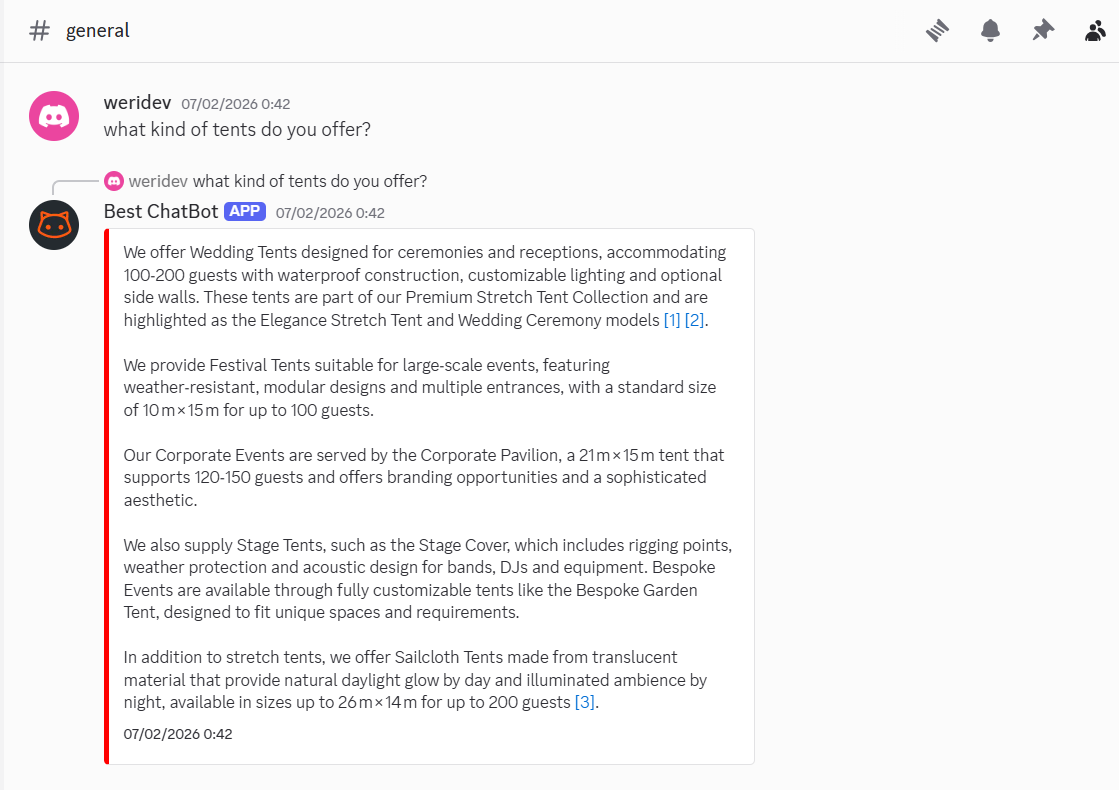
At the most basic level, a support bot monitors designated channels for questions and responds using a knowledge base derived from your documentation, FAQs, and past support content. When a member asks "How do I connect the Slack integration?", a well-configured bot retrieves the relevant section from your help docs and answers directly in the channel — or in a thread — within seconds.
More capable implementations go further. Using Retrieval-Augmented Generation (RAG) architecture — the same approach described in the academic literature on knowledge-grounded AI (Lewis et al., 2020; arXiv:2404.17723) — the bot does not simply match keywords to stored answers. It retrieves the most semantically relevant information from your knowledge base and generates a response grounded in that content, even for questions that were never explicitly anticipated during setup. This is what separates modern AI support bots from the rule-based bots that could only handle the 30% of questions they were explicitly programmed for (HelpCrunch data, cited in industry benchmarks).
The Use Cases That Matter Most
Discord communities vary widely in their support needs. A Web3 protocol community faces different questions than a SaaS developer community or a DTC brand's VIP server. That said, several use cases appear consistently across community types.
FAQ automation. The most common support load in any Discord server is also the most predictable: recurring questions that every new member asks. What are the token staking requirements? How do I set up the API key? What is the refund window? These questions represent the bulk of support volume, and they are exactly what an AI support bot handles best. Industry data consistently shows that 40–60% of incoming support volume consists of the top 20 most common questions — the highest-ROI target for any automation.
24/7 coverage across time zones. Developer and Web3 communities are global by default. Human moderators have schedules; community members do not. A Discord AI bot provides continuous coverage without requiring additional headcount. AIgentX, one of the AI bots deployed across Web3 Discord communities, serves 10 million users across 500+ communities with 24/7 automated response, reducing routine inquiries by 80% (Peera AI analysis, 2025).
Member onboarding. New member confusion is one of the highest-friction moments in any Discord community. A new user joins, does not know which channel to use, cannot find the getting-started guide, and either asks in the wrong channel or leaves silently. A support bot can respond automatically to new member joins, surface the most important onboarding resources, and answer early-stage questions before a human moderator ever needs to intervene. For member onboarding specifically, this automation dramatically improves the first-run experience.
Reducing moderator burnout. Discord moderation is already heavily automated — 96% of moderation actions on Discord are automated as of 2025 (SQ Magazine, 2025). But the support burden — answering substantive product questions — still falls on human moderators in most communities. Shifting routine support to an AI bot lets moderators focus on the work that actually requires human judgment: conflict resolution, community building, and escalations.
How It Differs From Generic Moderation Bots
This is a distinction worth being explicit about: a Discord support bot is not a moderation bot. Tools like MEE6 (installed on 21.3 million servers), Carl-bot (10.9 million), and Dyno (9.9 million) are automation and moderation tools — they handle role assignment, spam filtering, welcome messages, and rule enforcement. They do not answer questions about your product.
A support-focused Discord AI bot integrates with your knowledge base — your documentation, help articles, changelog, and FAQs — and uses that content as the source of truth for its responses. The result is a bot that can accurately answer product-specific questions, not just execute server management commands. For communities built around a product or service, this difference is the entire value proposition.
It also means the bot needs to be trained on your content, not on generic internet data. A bot that confidently invents answers based on what seems plausible — hallucinating policy details, version numbers, or pricing — does active damage to community trust. The same RAG-based architecture that reduces hallucinations by 70–90% in domain-specific customer service applications (enterprise benchmarks cited in Binary Semantics, 2025; corroborated by ScienceDirect RAGVA study, 2025) applies directly to Discord bot deployments. Grounding answers in your actual documentation is not optional — it is the baseline requirement for a bot that performs reliably in a live community.
Integration With Documentation: The Core Differentiator
The question community managers most frequently ask about Discord AI bots is: how does it know what to say? The answer is documentation integration.
A well-built Discord support bot connects to your existing knowledge sources — help center articles, product docs, FAQs, changelogs, and even past conversation threads — and uses them as the authoritative reference for every answer it generates. When your documentation changes, the bot's answers update to reflect that change without manual reprogramming.
This is what the research literature on RAG for customer service describes as knowledge grounding: rather than relying on parametric memory (what the model learned during training), the bot retrieves the current, authoritative version of the relevant information at query time. A peer-reviewed arXiv paper specifically on RAG for customer service question answering (arXiv:2404.17723, 2024) demonstrated that this approach improves retrieval accuracy over conventional methods by preserving the relational structure of support content — particularly valuable for products with complex, interdependent features.
For Discord communities specifically, this matters because communities evolve fast. A bot trained on a static snapshot of your docs from six months ago will generate wrong answers about features that have since changed. Real-time knowledge sync is not a premium feature — it is a prerequisite for a bot that remains useful over time. For more detail on how documentation-backed bots work, see the guide on Discord bot trained on your docs.
Setting Up a Discord Support Bot: What the Process Looks Like
Deploying an AI support bot on Discord does not require a developer. Modern platforms provide a guided setup that follows a consistent pattern.
Connect your knowledge base. Link your help center, upload documentation files, or paste in your FAQ content. The bot uses this as its exclusive source of truth — questions outside that scope get escalated rather than answered with fabricated information.
Configure channel scope. Decide which channels the bot monitors and responds in. Common configurations include a dedicated #support channel, a #faq channel, and automatic responses to new member join events. Limiting scope to relevant channels reduces noise and keeps the bot's responses contextually appropriate.
Set escalation rules. Define what the bot should not try to answer — billing disputes, sensitive account issues, content requiring human judgment — and configure clear escalation paths to moderators or a ticketing system. The Pylon guide on Discord customer support (2025) recommends implementing a ticket system to convert complex conversations into structured support cases, ensuring nothing gets lost in channel history.
Test with real queries. Run your twenty most common support questions through the bot before going live. Verify that answers are accurate, clearly worded, and appropriately scoped. If any answers are wrong or incomplete, update the underlying documentation — the bot's output quality directly mirrors the quality of its knowledge source.
Monitor and iterate. Review conversation logs weekly. Identify questions the bot failed to answer or escalated unnecessarily, and use those gaps to improve documentation coverage over time.
What to Measure
A Discord support bot should be measured against specific performance indicators, not just "it seems to be helping." The key metrics are:
Containment rate: What percentage of support questions does the bot resolve without escalation? A well-configured bot with strong documentation coverage should reach 60–80% containment for common question types.
Response time: AI bots respond in under one second. The standard expectation for chatbot response time is now sub-second in 2024 (industry benchmarks), compared to hours for async human moderator response in Discord.
Member satisfaction on bot-handled interactions: Track reactions or survey responses on bot replies to verify that automated answers are landing well with members.
Common Mistakes to Avoid
Using a generic chatbot instead of a support-specific one. General-purpose AI bots connected to large language models without documentation grounding will hallucinate product-specific answers. Community members notice. The trust damage compounds.
No escalation path. A bot that simply says "I don't have that information" and stops leaves the member with nowhere to go. Every unresolved query should surface a path to a human moderator or a ticket.
Deploying before documentation is ready. The bot is only as good as the content it draws from. If your help docs are incomplete or outdated, clean them up before deployment — not after.
Ignoring conversation data. Unanswered or incorrectly answered questions in the bot's logs are the most direct signal of what your documentation is missing. Treating those logs as a feedback loop is what separates improving deployments from static ones.
Frequently Asked Questions
Can a Discord support bot handle technical questions, not just FAQs? Yes, provided your technical documentation is included in the knowledge base. The depth of technical questions the bot can handle is proportional to the quality and coverage of the documentation it draws from. A bot connected to comprehensive API docs and a detailed changelog will handle developer questions significantly better than one trained only on marketing copy.
What happens when the bot does not know the answer? It should escalate gracefully — surfacing the question to a designated moderator channel or triggering a support ticket, depending on your server configuration. A clear escalation path is a design requirement, not an optional feature.
Will the bot post in public channels or use threads? Both configurations are possible. Threads are generally preferable for longer or more complex answers, as they keep public channels readable. For simple, one-line FAQ answers, direct channel responses can be faster and less friction for the member.
How long does setup take? For a well-documented knowledge base and a no-code platform, initial setup typically takes half an hour. The constraint is documentation quality, not technical complexity. Expect to iterate on knowledge base coverage over the first few weeks as you review conversation logs.
Next Steps
Discord communities that rely entirely on human moderators for support are leaving a significant operational problem unsolved. The combination of 24/7 member activity, global time zones, and high repetitive question volume makes AI automation not a convenience but a structural requirement for communities beyond a few hundred members.
Start with the Discord FAQ Bot guide to understand how to configure automated answers for your most common questions. If your community uses custom documentation, the Discord bot trained on your docs guide covers knowledge integration in detail. For integration specifics, see the Discord AI bot integration guide.
When you are ready to deploy, see BestChatBot.io pricing or start a free trial to test the bot against your own server's documentation and support patterns.
Sources
SQ Magazine. (2025). Discord statistics 2025: Active users, Nitro, bots & security.
XtendedView. (2025). Discord statistics 2026: Surprising growth data.
IconEra. (2025). Discord gaming server statistics 2025.
Blaze Marketing Analytics. (2024). Discord statistics and demographics 2024.
Pylon. (2025). Customer support on Discord: Complete 2025 guide.
Pylon. (2025). How AI-powered customer support reduces response times by 97%.
Freshworks. (2024). 20 key chatbot statistics for 2024.
Peera AI. (2025). Top 10 AI bots for Discord to boost your community.
Lewis, P., Perez, E., Piktus, A., et al. (2020). Retrieval-augmented generation for knowledge-intensive NLP tasks. NeurIPS 2020. arXiv:2005.11401.
arXiv:2404.17723. (2024). Retrieval-augmented generation with knowledge graphs for customer service question answering.
Nguyen, T. et al. (2025). RAGVA: Engineering retrieval augmented generation-based virtual assistants in practice. ScienceDirect / Journal of Systems and Software.
Binary Semantics. (2025). Retrieval augmented generation: Smarter, accurate AI chatbots.
AIPRM. (2024). 50+ AI in customer service statistics 2024.
Intercom. (2024). Customer service trends report 2024.